
NumberGuru: Spam & Caller ID
The NumberGuru LLCCommunication
3.455.00 Reviews
- Version
- 2.02.86
- Installs
- 10.00K
- Age Rating
- Everyone
Screenshots
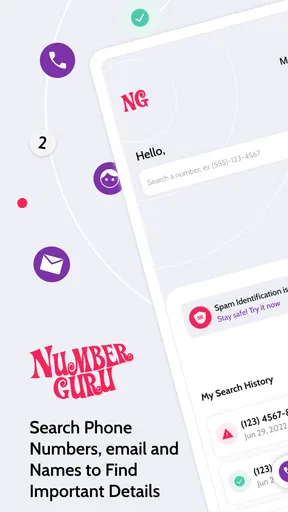
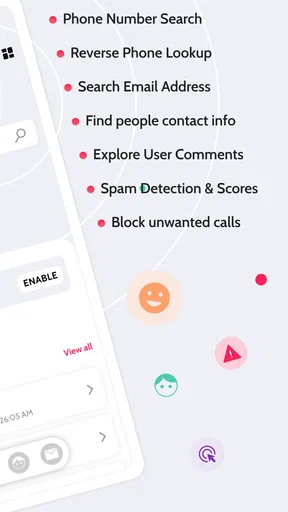
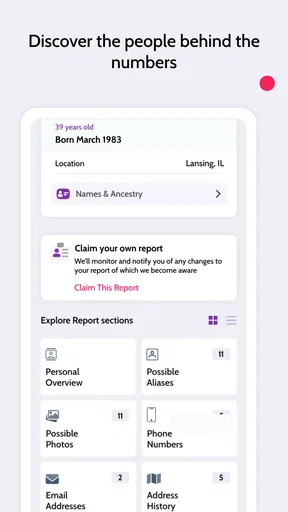
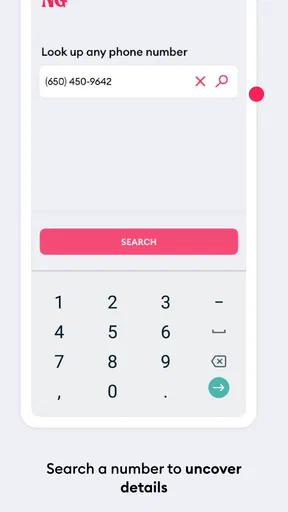
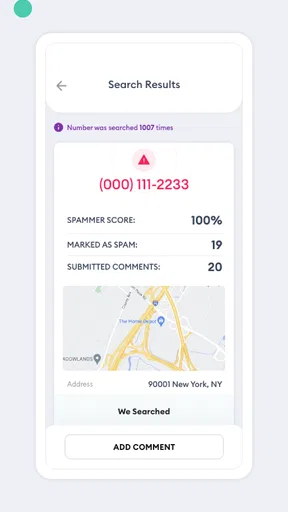
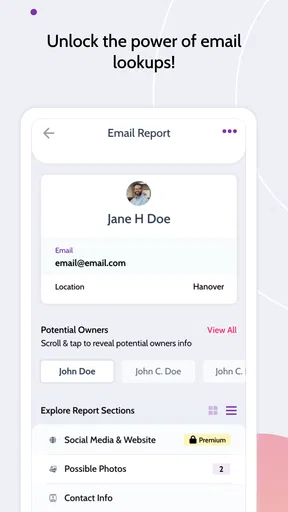
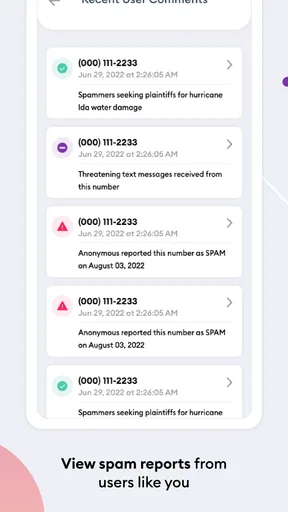
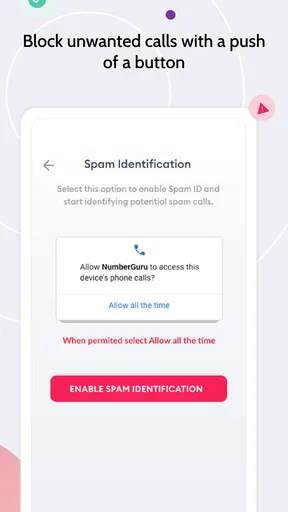
Our Review of NumberGuru: Spam & Caller ID
 Analysis by Appyee
When an unknown number appears on my phone, the useful question is rarely “who is calling?” in the abstract. I usually want to know whether I should answer, ignore the call, or return it later. NumberGuru: Spam & Caller ID is built around that small but important decision. It combines reverse phone number lookup with name and number searches, aiming to give an unfamiliar caller some context before I spend time on the conversation.
I see it as a focused communication app rather than a complete replacement for the phone app. Its value depends on how often unknown calls interrupt your day and how much information the lookup can provide for a particular number. In my experience, that makes it most interesting for people who receive repeated calls from unfamiliar businesses, delivery services, survey lines, or possible spam sources.
What the caller-identification capability really changes
The central capability is simple: I enter a phone number and use the result to decide what to do next. That sounds modest, but the decision is useful when a call arrives at an inconvenient time. Instead of answering every number automatically, I can check it first and avoid turning a short interruption into a long, unwanted conversation.
The app’s store summary presents it as a tool for reverse phone lookup, name and number searches, and spam-call identification. Those are closely related tasks, but they serve different moments. A reverse lookup is useful after I notice a missed call. A name search can help when I remember a contact but not the number. Spam identification matters most before I answer or call back.
That distinction is important because no lookup tool can make every unknown number obvious. A number connected to a recognizable record may be easier to understand than a newly used number, a private individual, or a caller whose information is not clearly associated with one identity. I would therefore treat a result as practical guidance, not as absolute proof of who is behind the phone.
For me, the strongest effect is reducing uncertainty. The app does not need to solve every call for it to be worthwhile. If it helps separate a likely nuisance call from something I may genuinely need to return, it has already improved the way I handle interruptions. That is a more realistic expectation than assuming every search will produce a complete caller profile.
Using a lookup after a missed call
My preferred workflow is to wait until I have a reason to investigate instead of searching every number that flashes on the screen. If I miss a call from a number I do not recognize, I open NumberGuru, search the number, and use the result as one piece of context. I then compare that context with the timing of the call, any voicemail, and whether the same number has tried more than once.
This approach avoids a common mistake: calling back immediately just because a number looks unfamiliar. A lookup can be a useful pause between the missed call and the callback. If the result suggests a spam-related pattern, ignoring the call may be sensible. If it appears connected to a service I am expecting, I can return it with more confidence. If the result is unclear, I can wait for a voicemail or use another trusted channel to confirm the caller.
That last step is especially important for sensitive matters. I would not give payment details, account passwords, verification codes, or personal documents to someone merely because a lookup produces a name. Caller information can help with triage, but it should not replace independent verification when money or account access is involved.
Searching a name or number when memory is incomplete
The name-and-number search angle is useful in a slightly different way. Sometimes I remember a person or organization but cannot find the old conversation where the number appeared. In that situation, searching the detail I do have can be quicker than sorting through contacts, messages, and call history. It is a practical recovery tool, particularly when the number is not saved under a clear label.
I would still keep expectations measured. A search result may be more useful for identifying a broad connection than for reconstructing a full relationship. For example, it might help me recognize that a call is associated with a business or a familiar name, while the final decision still depends on what I was expecting that day. The app is best at supplying context, not at making personal decisions for me.
How it fits into an everyday call routine
Imagine I am waiting for a repair appointment and receive a call from a number I have never saved. Answering could be reasonable, but I may be in a meeting or somewhere noisy. If I let it go to voicemail, I can search the number afterward. A useful result may tell me whether the call deserves a callback, while an apparent spam signal gives me a reason not to react immediately.
That workflow is more valuable than constantly watching for a perfect caller ID label. It turns the app into a second step after the phone rings: receive the interruption, investigate only when necessary, then choose whether to respond. For people who receive many calls from unfamiliar numbers, this can make the phone feel less demanding without requiring them to answer everything.
I also like the possibility of using the search before returning a call. A missed call can create pressure, especially when the number looks local or familiar. Looking it up first gives me a moment to check whether I recognize the source. If the result does not provide enough confidence, I can avoid a blind callback and wait for another message.
There is a practical trade-off in this workflow, though. It adds a step. If you rarely receive unknown calls, opening a separate app for one occasional search may feel slower than simply ignoring the number or checking a search engine. NumberGuru makes more sense when this decision happens often enough that a dedicated lookup feels convenient.
Why the best use case is repeated uncertainty
The app’s most convincing scenario is not one dramatic call; it is the repeated stream of uncertain calls that gradually wastes attention. A person working from home, managing a small business, waiting for appointments, or using a phone for both personal and practical matters may regularly face numbers that are not saved. In that setting, a quick lookup can become a small daily habit.
It can also help people who are cautious about returning calls. Some users prefer not to answer unknown numbers at all, but they still need a way to decide whether a missed call matters. Searching afterward gives them more control. The app is not forcing a response; it supports a more deliberate one.
Another useful case is separating an unfamiliar legitimate call from a suspicious one without relying only on appearance. A local-looking number is not automatically trustworthy, and a number that seems ordinary may still be unwanted. The lookup encourages me to judge the call by more than its area code or the fact that it rang more than once.
For families, I would explain the app’s role carefully rather than presenting it as a guarantee of safety. It may help a less confident phone user pause before returning an unknown call, but the person should still know not to share sensitive information based only on a caller label. The most helpful habit is “check, then verify,” not “check, then trust.”
What I would do when the result is unclear
An unclear lookup is not a failed experience if it prevents an impulsive callback. I would check whether the caller left a voicemail, whether the number appears again, and whether I can contact the supposed organization through a number I already trust. This is one of the app’s less obvious benefits: it can make uncertainty visible instead of encouraging a false sense of certainty.
I would also avoid treating repeated calls as automatic evidence that the caller is legitimate. Persistence can mean urgency, but it can also be a tactic used by unwanted callers. NumberGuru is most useful when its result is combined with the content of the voicemail and my own expectations.
For a number connected to a bank, delivery company, medical provider, or government service, I would use the app only as an initial clue. I would then open the organization’s official app, visit a known website, or use paperwork I already have to find a safe contact route. That extra step matters more than any convenient label.
Trade-offs that affect the recommendation
NumberGuru is free to install, which makes trying the basic idea easy. The app is rated for Everyone, and its minimum operating-system requirement is Android 7.0, so it can suit people using older compatible phones as well as more recent devices. Its current version is 2.02.86, giving prospective users a clear reference point when checking compatibility.
The service is developed by The NumberGuru LLC and has passed the early trial stage of a brand-new release. It has more than ten thousand installs, with an average rating of 3.4 from a little over a hundred ratings and dozens of written reviews. I read that overall picture as mixed rather than alarming: enough adoption to show that the idea is useful to some people, but not a signal that every lookup will be equally satisfying.
The free entry point is a genuine advantage for occasional users. I can test whether the search results are useful for the kinds of numbers I encounter without committing money first. At the same time, in-app purchases are listed at $24.99 per item, so I would pay close attention to what a purchase unlocks and whether I personally need it before spending anything.
That price point changes the decision for light users. If I only investigate an unknown number once in a while, the free experience may be all I need, and a paid item may not justify the cost. Someone who depends on repeated searches should evaluate the purchase based on actual usage rather than assuming that a paid option will automatically provide certainty or better judgment.
Another trade-off is the difference between a dedicated lookup app and tools already present on a phone. The built-in phone experience may be faster for blocking or recognizing calls that are already known to the device. A general web search may be enough for a well-known business. NumberGuru becomes more compelling when I want a purpose-built place to search a number or name and use that information as part of a repeatable routine.
It also should not be confused with a full contact-management system. Its appeal is the investigation of unfamiliar numbers, not replacing the organization of saved contacts, messages, or call history. If your main problem is remembering people you already know, a better contact app may solve more of it. If your problem is deciding what to do with numbers you do not recognize, this app is more closely aligned with the need.
Privacy and security require sensible boundaries
Whenever I use a reverse lookup, I think about the information I am searching and the decisions that follow. I would not use a result to accuse someone, publish a person’s details, or make a serious decision without checking another source. A phone number can be shared, reassigned, mistyped, or connected to incomplete information.
I would also avoid entering extra personal details unless the app clearly requires them for the search I intend to perform. Keeping the workflow narrow is a good habit: search the number or name relevant to the call, review the result, and leave. The less information I volunteer, the easier it is to keep the tool focused on its intended purpose.
This is not a criticism unique to NumberGuru; it is part of using any caller-identification service responsibly. The convenience comes from turning a phone number into context, but context is not the same as identity verification. I consider that distinction essential, particularly when a caller tries to create urgency.
Who should choose it and who should skip it
I would recommend NumberGuru to someone who frequently receives calls from unknown numbers and wants a simple way to investigate them before calling back. It is especially suitable for people who prefer screening missed calls later, rather than answering everything in real time. The free starting point also makes it approachable for users who want to test the usefulness of reverse lookup without an upfront purchase.
I would be more cautious about recommending it to someone who expects flawless caller identification, complete background information, or a guaranteed spam verdict. Those expectations are too high for a lookup service. The app can support a decision, but it cannot remove the need for common sense, voicemail checks, and independent verification.
I would also skip it if my main need is aggressive automatic call blocking, advanced contact organization, or a comprehensive security suite. A phone’s built-in controls or a specialized alternative may be a better fit for those jobs. NumberGuru’s strength is narrower: it helps me investigate a number or name when the caller is not already familiar.
For older Android phones that meet the operating-system requirement, it may be worth testing because the app does not demand a recent platform. For iPhone users, I would check the relevant store experience and compatibility before planning a routine around it. In either case, I would judge it by the usefulness of the searches I actually perform, not by the promise of identifying every call.
My final take after using the lookup approach
NumberGuru: Spam & Caller ID works best when I treat it as a decision aid rather than a magic caller detector. Its reverse phone lookup and name-and-number search can turn an unfamiliar call into a more manageable question: is this worth my attention right now? That small change is valuable for people whose phones regularly interrupt work, errands, or family time.
I appreciate the free starting point, the Everyone age rating, and the focus on a problem that is easy to understand. I also think the mixed average rating and modest install base are useful reminders to keep expectations realistic. Results may be more helpful for some numbers than others, and the paid items at $24.99 each deserve careful consideration before purchase.
My practical recommendation is to use it after missed calls, not as a reason to answer every unknown number. Search the number, check for a voicemail, compare the result with what you were expecting, and independently verify any important caller. The best outcome is not learning a name; it is making a safer, calmer choice about whether to respond.
With that mindset, I can see a clear place for this communication app. It is a sensible option for frequent unknown-call screening, particularly when a dedicated lookup workflow feels more convenient than searching randomly or returning calls blindly. It is not the right tool for every phone problem, but for the specific problem of deciding what an unfamiliar number might mean, it offers a useful layer of context without demanding a complicated routine.
Verdict
Strengths of NumberGuru: Spam & Caller ID
- Identifies many unknown callers before you answer.
- Reverse phone lookup can reveal useful caller details.
- Spam reports help users avoid recurring nuisance numbers.
- Simple interface makes searches quick and easy.
- Caller information can improve confidence when returning calls.
Limitations of NumberGuru: Spam & Caller ID
- Results may be incomplete for private or newly registered numbers.
- Some features may require a paid subscription.
- Caller labels are not always accurate or up to date.
- The app may request access to sensitive phone permissions.
- Frequent lookups can use mobile data and battery in the background.
Similar Picks in This Category
View All
Google Messages
Google LLC4.6

Gmail
Google LLC4.1

Google Meet
Google LLC4.4

Google Chrome
Google LLC4.1

WhatsApp Messenger
WhatsApp LLC4.6

Carrier Services
Google LLC4.2
Frequently Asked Questions
What is NumberGuru: Spam & Caller ID used for?
NumberGuru: Spam & Caller ID is designed to help identify unknown callers and recognize potentially unwanted or fraudulent phone numbers. Before answering, you can use the app to check whether a number has been reported by other users or associated with telemarketing, scams, or spam activity. It can be especially useful when you regularly receive calls from unfamiliar numbers.
Does NumberGuru identify every unknown phone number accurately?
No caller-identification service can guarantee accurate results for every number. NumberGuru’s information may depend on available public data, user reports, business listings, and the number’s history. Some results may be incomplete, outdated, or incorrectly labeled, particularly with newly created numbers, private callers, spoofed caller IDs, or numbers that have not yet been reported.
Does the app block spam calls automatically?
NumberGuru primarily focuses on caller identification and reverse phone-number searches, while blocking features may depend on the version of the app, your device, and system permissions. You should review the in-app settings after installation to see whether call blocking or spam warnings are available. On some phones, additional operating-system permissions may be required.
What permissions and personal information does NumberGuru require?
Depending on the features you enable, the app may request access related to phone calls, contacts, notifications, or your device’s calling functions. These permissions allow it to display caller information or warn you about suspected spam. Before accepting, read the app’s current privacy policy and permission explanations, since data practices and available options can change with updates.
Is NumberGuru: Spam & Caller ID free to download and use?
The app may be available to download at no initial cost, but some functions can be limited by advertisements, usage restrictions, subscriptions, or optional in-app purchases. The exact pricing and included features may vary by country, platform, and app version. Check the store listing and subscription screen carefully before confirming any paid trial or recurring plan.
